
In this article we are going to cover Managing Large-Scale Infrastructure with Terraform Modules.
As your cloud infrastructure grows, your Terraform codebase can quickly become large, hard to manage, and prone to human error. That’s where Terraform modules come in. They help you organize, reuse, and scale your infrastructure effectively.
This article is a guide to:
- Creating and using Terraform modules
- Managing module updates
- Storing and version-controlling modules
- Applying best practices for large-scale infrastructure management
Table of Contents
What Are Terraform Modules?
A module in Terraform is simply a folder with one or more .tf files. Think of it as a reusable package of Terraform configurations.
Instead of repeating the same configuration (e.g., VPCs, EC2 instances) across multiple projects, you create a module once and reuse it.
Step #1:Set Up Your Project Structure
Start by creating a clean directory structure for your Terraform project:
mkdir terraform-large-scale
cd terraform-large-scale
mkdir modules
mkdir modules/vpc
mkdir modules/ec2
Create the main and module files:
touch main.tf
cd modules/vpc && touch main.tf && cd ../ec2 && touch main.tf
You should now have:
terraform-large-scale/
├── main.tf
└── modules/
    ├── ec2/
    │   └── main.tf
    └── vpc/
        └── main.tf
Step #2:Build the VPC Module
Edit modules/vpc/main.tf to look like this:
resource "aws_vpc" "main" {
  cidr_block = var.cidr_block
}

variable "cidr_block" {
  description = "The CIDR block for the VPC"
  type        = string
}
Step #3:Build the EC2 Module
Edit modules/ec2/main.tf:
resource "aws_instance" "web" {
  ami           = var.ami
  instance_type = var.instance_type
}

variable "ami" {
  description = "AMI ID for the EC2 instance"
  type        = string
}

variable "instance_type" {
  description = "EC2 instance type"
  type        = string
}
Step #4:Use the Modules in main.tf
Edit the root main.tf file:
provider "aws" {
  region = "us-east-1"
}

module "vpc" {
  source     = "./modules/vpc"
  cidr_block = "10.0.0.0/16"
}

module "ec2" {
  source        = "./modules/ec2"
  ami           = "ami-0c55b159cbfafe1f0"  # Example Ubuntu AMI
  instance_type = "t2.micro"
}
Step #5:Initialize and Apply
Run the following commands:
terraform init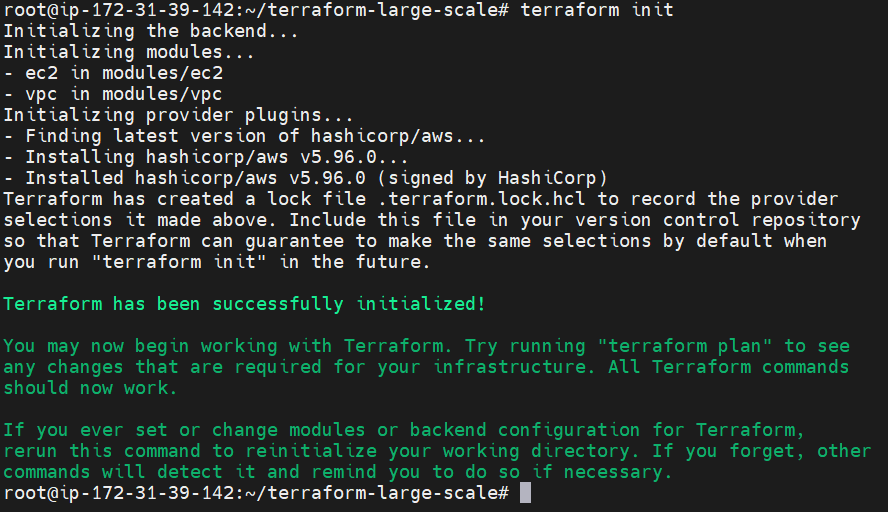
terraform apply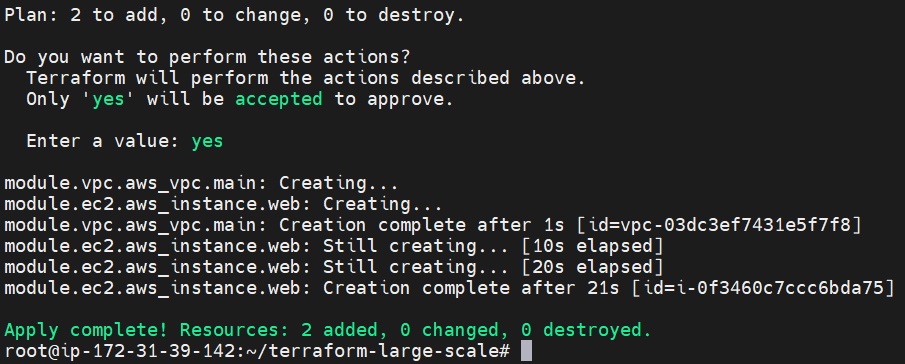
Terraform will prompt you to confirm before creating the infrastructure.
Step #6:Refresh Modules Using get or module update
If you change anything inside a module (e.g., update the VPC config), refresh the modules in your project:
terraform get -update
This ensures your modules are always in sync with the latest changes.
Step #7:Store Modules in a Git Repository
To make modules reusable across projects and teams, store them in a Git repo.
Example:
- Create a new GitHub repo called
terraform-aws-vpc-module. - Push your
modules/vpc/content to that repo. - Use it like this in
main.tf:
module "vpc" {
  source     = "git::https://github.com/your-username/terraform-aws-vpc-module.git//vpc?ref=v1.0.0"
  cidr_block = "10.0.0.0/16"
}
This gives you version control and clean modular access.
Pro Tips for Large-Scale Infra Management
| Tip | What to Do |
|---|---|
| Break infra into reusable modules | VPC, EC2, RDS, S3… make one module for each. |
Use terraform get or terraform module update | Refresh modules after updates. |
| Store modules in Git or a private registry | Ensure version control and team access. |
Organize with Environments
For staging, prod, and dev setups, structure like:
environments/
├── dev/main.tf
├── staging/main.tf
└── prod/main.tf
Each can call the same modules with different variables.
Conclusion:
As you scale your cloud projects, managing all your Terraform code in a single file or directory becomes inefficient and difficult. Terraform modules provide a clean and reusable way to organize your infrastructure components. They allow you to reuse code across different environments, simplify infrastructure updates, and collaborate with your team more effectively. By breaking your infrastructure into modular parts and storing them in version-controlled repositories, you create a scalable, maintainable, and professional workflow for managing cloud infrastructure.
